
4.5. 图像分类数据集
MNIST数据集 () 是图像分类中广泛使用的数据集之一,但作为基准数据集过于简单。 我们将使用类似但更复杂的Fashion-MNIST数据集 ()。
%matplotlib inline
import math
import random
import mlx.core as mx
import mlx.data as dx
import numpy as np
from d2l import mlx as d2l

d2l.use_svg_display()
4.5.1. 读取数据集
我们可以通过框架中的内置函数将Fashion-MNIST数据集下载并读取到内存中。
mnist_train = dx.datasets.load_fashion_mnist(root="../data", train=True)
mnist_test  = dx.datasets.load_fashion_mnist(root="../data", train=False)
Fashion-MNIST由10个类别的图像组成, 每个类别由训练数据集(train dataset)中的6000张图像 和测试数据集(test dataset)中的1000张图像组成。 因此,训练集和测试集分别包含60000和10000张图像。 测试数据集不会用于训练,只用于评估模型性能。
len(mnist_train), len(mnist_test)
(60000, 10000)
每个输入图像的高度和宽度均为28像素。 数据集由灰度图像组成,其通道数为1。 为了简洁起见,本书将高度\(h\)像素、宽度\(w\)像素图像的形状记为\(h \times w\)或(\(h\),\(w\))。
mnist_train[0]["image"].shape
(28, 28, 1)
Fashion-MNIST中包含的10个类别,分别为t-shirt(T恤)、trouser(裤子)、pullover(套衫)、dress(连衣裙)、coat(外套)、sandal(凉鞋)、shirt(衬衫)、sneaker(运动鞋)、bag(包)和ankle boot(短靴)。 以下函数用于在数字标签索引及其文本名称之间进行转换。
def get_fashion_mnist_labels(labels):  #@save
    """返回Fashion-MNIST数据集的文本标签"""
    text_labels = ['t-shirt', 'trouser', 'pullover', 'dress', 'coat',
                   'sandal', 'shirt', 'sneaker', 'bag', 'ankle boot']
    return [text_labels[int(i.item())] for i in labels]
我们现在可以创建一个函数来可视化这些样本。
def show_images(imgs, num_rows, num_cols, titles=None, scale=1.5):  #@save
    """绘制图像列表"""
    figsize = (num_cols * scale, num_rows * scale)
    _, axes = d2l.plt.subplots(num_rows, num_cols, figsize=figsize)
    axes = axes.flatten()
    for i, (ax, img) in enumerate(zip(axes, imgs)):
        if type(img) == mx.array:
            # 图片张量
            ax.imshow(np.array(img))
        else:
            # PIL图片
            ax.imshow(img)
        ax.axes.get_xaxis().set_visible(False)
        ax.axes.get_yaxis().set_visible(False)
        if titles:
            ax.set_title(titles[i])
    return axes
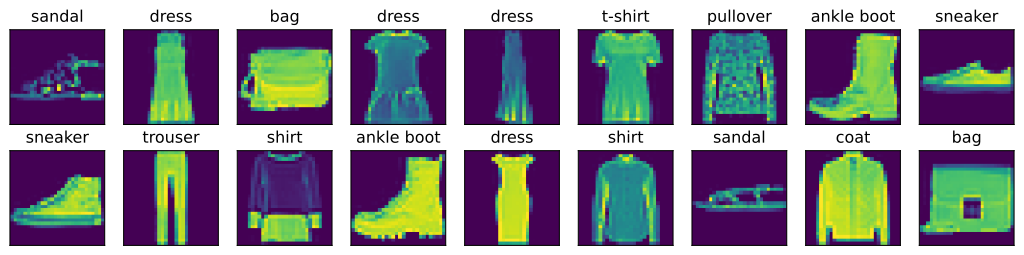
以下是训练数据集中前几个样本的图像及其相应的标签。
mnist_train_iter = (
    mnist_train
    .shuffle()
    .to_stream()
    .batch(18)
)

batch = next(mnist_train_iter)
X, y = batch["image"], batch["label"]

show_images(X, 2, 9, titles=get_fashion_mnist_labels(y))
array([<Axes: title={'center': 'sandal'}>,
       <Axes: title={'center': 'dress'}>, <Axes: title={'center': 'bag'}>,
       <Axes: title={'center': 'dress'}>,
       <Axes: title={'center': 'dress'}>,
       <Axes: title={'center': 't-shirt'}>,
       <Axes: title={'center': 'pullover'}>,
       <Axes: title={'center': 'ankle boot'}>,
       <Axes: title={'center': 'sneaker'}>,
       <Axes: title={'center': 'sneaker'}>,
       <Axes: title={'center': 'trouser'}>,
       <Axes: title={'center': 'shirt'}>,
       <Axes: title={'center': 'ankle boot'}>,
       <Axes: title={'center': 'dress'}>,
       <Axes: title={'center': 'shirt'}>,
       <Axes: title={'center': 'sandal'}>,
       <Axes: title={'center': 'coat'}>, <Axes: title={'center': 'bag'}>],
      dtype=object)
4.5.2. 读取小批量
为了使我们在读取训练集和测试集时更容易,我们使用内置的数据迭代器,而不是从零开始创建。
回顾一下,在每次迭代中,数据加载器每次都会读取一小批量数据,大小为batch_size。
通过内置数据迭代器,我们可以随机打乱了所有样本,从而无偏见地读取小批量。
batch_size = 256

train_iter = (
    mnist_train
    .shuffle()
    .to_stream()
    .batch(batch_size)
)
我们看一下读取训练数据所需的时间。
timer = d2l.Timer()
for X, y in train_iter:
    continue
f'{timer.stop():.2f} sec'
'0.05 sec'
4.5.3. 整合所有组件
现在我们定义load_data_fashion_mnist函数,用于获取和读取Fashion-MNIST数据集。
这个函数返回训练集和验证集的数据迭代器。
此外,这个函数还接受一个可选参数resize,用来将图像大小调整为另一种形状。
def load_data_fashion_mnist(batch_size, resize=None): #@save
    """下载Fashion-MNIST数据集,然后将其加载到内存中"""

    mnist_train = dx.datasets.load_fashion_mnist(root="../data", train=True)
    mnist_test  = dx.datasets.load_fashion_mnist(root="../data", train=False)

    is_resize_enabled = resize is not None and resize > 0
    resize = 0 if not is_resize_enabled else resize

    # 与load_array一直,dict的key分别为"X"和"y"
    mnist_train_iter = (
        mnist_train
        .shuffle()
        .image_resize_if(is_resize_enabled, "image", resize, resize)
        .key_transform("image", lambda x: x.astype("float32") / 255)
        .key_transform("label", lambda x: x.astype("int64"))
        .rename_key("image", "X")
        .rename_key("label", "y")
        .to_stream()
        .batch(batch_size)
    )

    mnist_test_iter = (
        mnist_test
        .image_resize_if(is_resize_enabled, "image", resize, resize)
        .key_transform("image", lambda x: x.astype("float32") / 255)
        .key_transform("label", lambda x: x.astype("int64"))
        .rename_key("image", "X")
        .rename_key("label", "y")
        .to_stream()
        .batch(batch_size)
    )

    return (mnist_train_iter, mnist_test_iter)
下面,我们通过指定resize参数来测试load_data_fashion_mnist函数的图像大小调整功能。
train_iter, test_iter = load_data_fashion_mnist(32, resize=64)
for sample in train_iter:
    X, y = sample["X"], sample["y"]
    print(X.shape, X.dtype, y.shape, y.dtype)
    break
(32, 64, 64, 1) float32 (32,) int64
我们现在已经准备好使用Fashion-MNIST数据集,便于下面的章节调用来评估各种分类算法。
4.5.4. 小结
Fashion-MNIST是一个服装分类数据集,由10个类别的图像组成。我们将在后续章节中使用此数据集来评估各种分类算法。
我们将高度\(h\)像素,宽度\(w\)像素图像的形状记为\(h \times w\)或(\(h\),\(w\))。
数据迭代器是获得更高性能的关键组件。依靠实现良好的数据迭代器,利用高性能计算来避免减慢训练过程。
4.5.5. 练习
减少
batch_size(如减少到1)是否会影响读取性能?数据迭代器的性能非常重要。当前的实现足够快吗?探索各种选择来改进它。
查阅框架的在线API文档。还有哪些其他数据集可用?